> ## Documentation Index
> Fetch the complete documentation index at: https://docs.getgranite.ai/llms.txt
> Use this file to discover all available pages before exploring further.
# Members
> Manage team members and roles in your organization
## Team Management
The Members page lets you invite colleagues, manage roles, and control access to your organization.
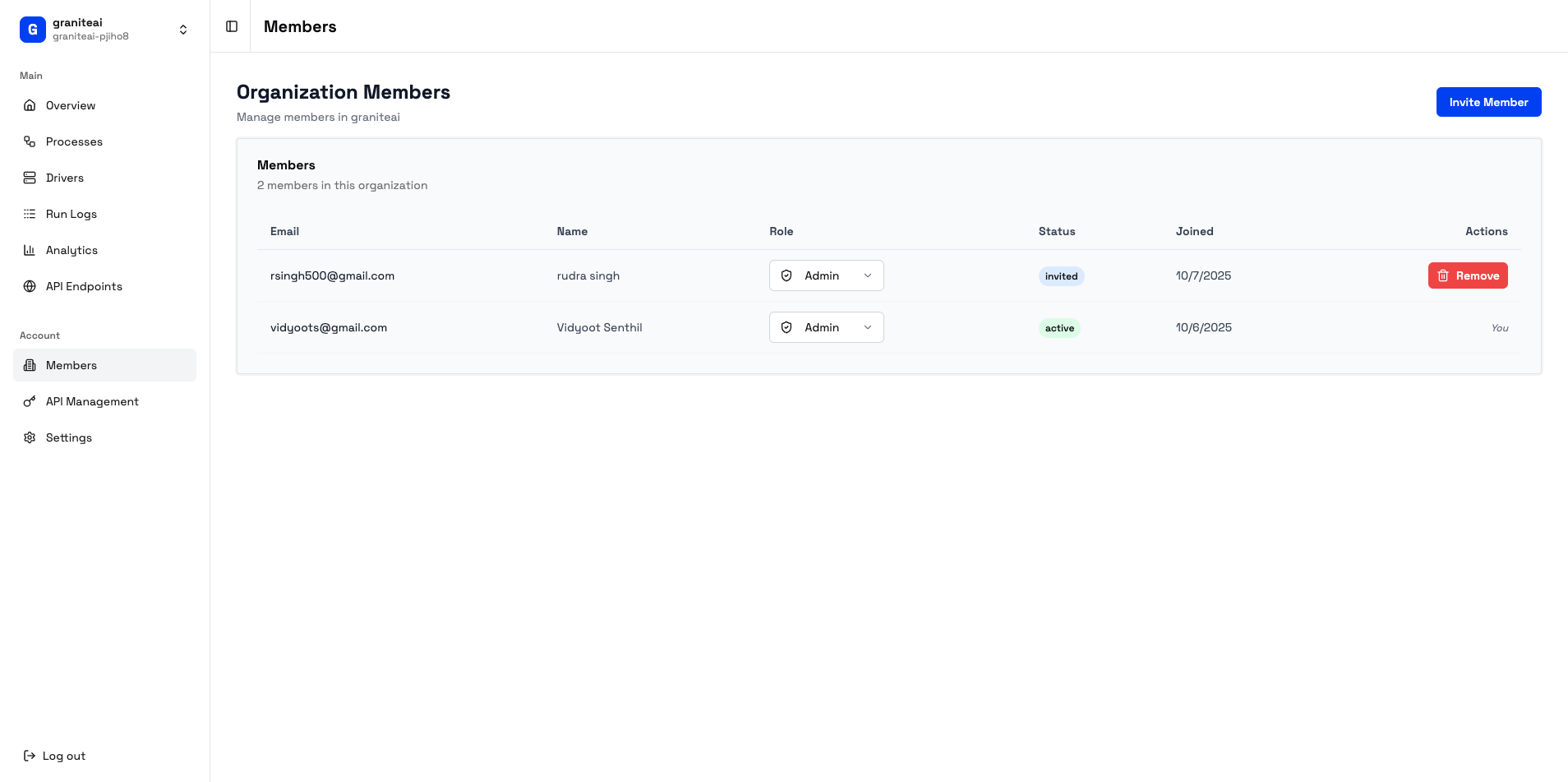 ## Member List
View all members of your organization:
| Column | Description |
| --------------- | ------------------------ |
| **Name** | Member's display name |
| **Email** | Login email address |
| **Role** | Admin, Member, or Viewer |
| **Joined** | When they joined |
| **Last Active** | Most recent login |
## Roles and Permissions
**Full access to everything:**
* Create and edit processes
* Run automations
* View all logs and analytics
* Manage API keys and endpoints
* Invite and remove members
* Change member roles
* Access organization settings
**Standard access:**
* Create and edit processes
* Run automations
* View logs and analytics
**Cannot:**
* Manage API keys
* Invite or manage members
* Access organization settings
**Read-only access:**
* View processes (can't edit)
* View logs and analytics
**Cannot:**
* Create or run automations
* Manage anything
## Inviting Members
Hit the **+ Invite** button
Type the email of the person you want to invite
Choose Admin, Member, or Viewer
Click **Send Invite**
They'll receive an email with a link to join.
Invites are tied to specific email addresses. The recipient must use that exact email to join.
## Changing Roles
To change a member's role:
1. Find them in the member list
2. Click the role dropdown
3. Select the new role
4. Changes take effect immediately
Be careful demoting the last Admin. Someone needs Admin access to manage the organization.
## Removing Members
To remove a member:
1. Find them in the list
2. Click the **...** menu
3. Select **Remove Member**
4. Confirm removal
Removed members:
* Lose access immediately
* Can be re-invited later
* Don't lose their personal Granite account
## Pending Invitations
View invitations that haven't been accepted:
| Status | Meaning |
| ----------- | ------------------------------- |
| **Pending** | Waiting for recipient to accept |
| **Expired** | Invitation expired (7 days) |
You can:
* **Resend** - Send the invite email again
* **Revoke** - Cancel the invitation
## Best Practices
Give members only the access they need. Start with Viewer, upgrade to Member when needed.
Don't rely on a single Admin. If they leave or lose access, someone else needs to manage the org.
Remove people who no longer need access. Check quarterly.
Invite people with company email addresses, not personal ones. Easier to manage offboarding.
## Audit Trail
All member changes are logged:
* Who was invited and by whom
* Role changes
* Removals
View the audit log in Organization Settings.
## SDK Example
Manage members programmatically:
```typescript theme={null}
import { client } from '@getgraniteai/ts-sdk';
// List members
const members = await client.listOrganizationMembers({
organizationId: 'org_123'
});
// Invite new member
await client.inviteMember({
organizationId: 'org_123',
email: 'colleague@company.com',
role: 'member'
});
// Update role
await client.updateMemberRole({
organizationId: 'org_123',
memberId: 'mem_456',
role: 'admin'
});
// Remove member
await client.removeMember({
organizationId: 'org_123',
memberId: 'mem_456'
});
```
## Next Steps
Configure org-wide settings
Manage API access
## Member List
View all members of your organization:
| Column | Description |
| --------------- | ------------------------ |
| **Name** | Member's display name |
| **Email** | Login email address |
| **Role** | Admin, Member, or Viewer |
| **Joined** | When they joined |
| **Last Active** | Most recent login |
## Roles and Permissions
**Full access to everything:**
* Create and edit processes
* Run automations
* View all logs and analytics
* Manage API keys and endpoints
* Invite and remove members
* Change member roles
* Access organization settings
**Standard access:**
* Create and edit processes
* Run automations
* View logs and analytics
**Cannot:**
* Manage API keys
* Invite or manage members
* Access organization settings
**Read-only access:**
* View processes (can't edit)
* View logs and analytics
**Cannot:**
* Create or run automations
* Manage anything
## Inviting Members
Hit the **+ Invite** button
Type the email of the person you want to invite
Choose Admin, Member, or Viewer
Click **Send Invite**
They'll receive an email with a link to join.
Invites are tied to specific email addresses. The recipient must use that exact email to join.
## Changing Roles
To change a member's role:
1. Find them in the member list
2. Click the role dropdown
3. Select the new role
4. Changes take effect immediately
Be careful demoting the last Admin. Someone needs Admin access to manage the organization.
## Removing Members
To remove a member:
1. Find them in the list
2. Click the **...** menu
3. Select **Remove Member**
4. Confirm removal
Removed members:
* Lose access immediately
* Can be re-invited later
* Don't lose their personal Granite account
## Pending Invitations
View invitations that haven't been accepted:
| Status | Meaning |
| ----------- | ------------------------------- |
| **Pending** | Waiting for recipient to accept |
| **Expired** | Invitation expired (7 days) |
You can:
* **Resend** - Send the invite email again
* **Revoke** - Cancel the invitation
## Best Practices
Give members only the access they need. Start with Viewer, upgrade to Member when needed.
Don't rely on a single Admin. If they leave or lose access, someone else needs to manage the org.
Remove people who no longer need access. Check quarterly.
Invite people with company email addresses, not personal ones. Easier to manage offboarding.
## Audit Trail
All member changes are logged:
* Who was invited and by whom
* Role changes
* Removals
View the audit log in Organization Settings.
## SDK Example
Manage members programmatically:
```typescript theme={null}
import { client } from '@getgraniteai/ts-sdk';
// List members
const members = await client.listOrganizationMembers({
organizationId: 'org_123'
});
// Invite new member
await client.inviteMember({
organizationId: 'org_123',
email: 'colleague@company.com',
role: 'member'
});
// Update role
await client.updateMemberRole({
organizationId: 'org_123',
memberId: 'mem_456',
role: 'admin'
});
// Remove member
await client.removeMember({
organizationId: 'org_123',
memberId: 'mem_456'
});
```
## Next Steps
Configure org-wide settings
Manage API access